How to Organize a Class Parent Group (Without 300 Unread Messages)
Every school year starts the same way. Someone creates a group chat for the class, adds thirty parents, and within a week it has three hundred messages. Half are "thank you!", a quarter are questions that were answered yesterday, and somewhere in the middle is the date of the class trip, which nobody can find anymore.
It isn't anyone's fault. A group chat is a great tool for some things and a terrible one for others. The trick to a calm parent group is knowing which is which, and giving the important things a place to live.
Why parent groups get messy so fast
A parent group has a few features that make it harder than most groups:
- It's big. Twenty-five children usually means forty or more adults.
- Nobody chose to be there. People joined because their child is in the class, not because they love group chats.
- The information is time-sensitive. A trip form due Thursday is useless if someone sees it on Friday.
- People join late. New families arrive mid-year and have no way to scroll back through months of messages.
Put all of that into a single stream of messages and the result is predictable: the people who check constantly feel overwhelmed, and the people who don't check miss things.
One rule: the chat is for now, the Room is for later
The most useful decision a class rep can make is to split the group's communication into two places.
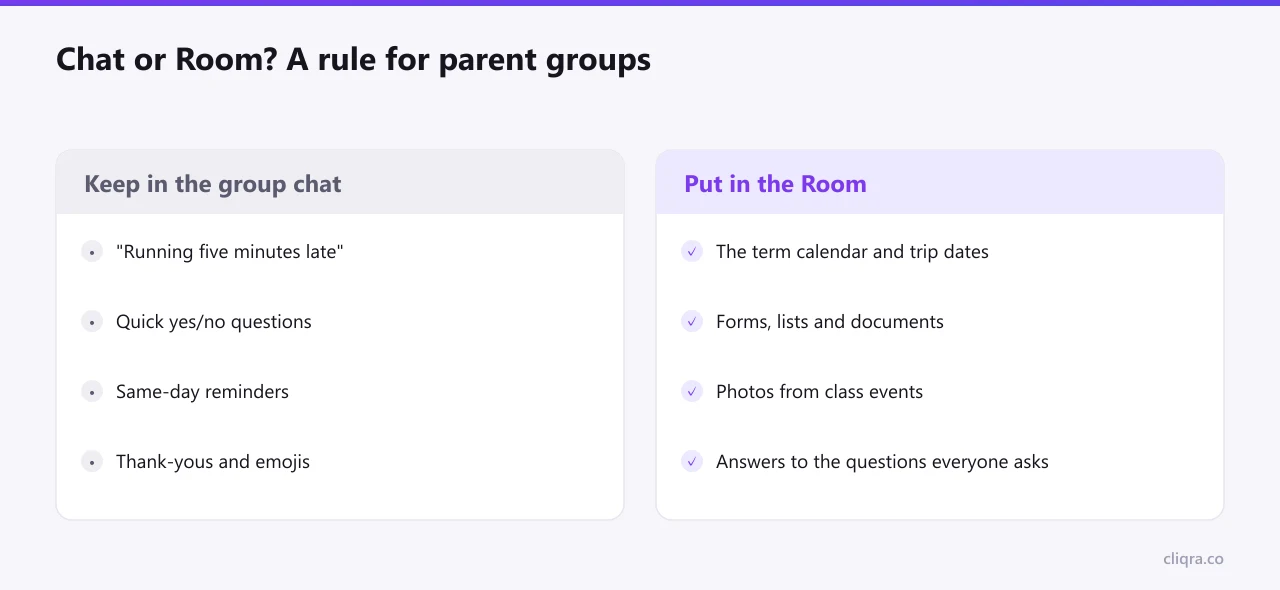
Keep the group chat for things that matter today and won't matter tomorrow: "running five minutes late", "does anyone have a spare swimming cap?", "pickup is at 1pm because of the strike." Fast, short, disposable.
Everything someone might look for later goes into a shared space: the term calendar, the list of who's bringing what to the end-of-year party, the permission slip, the photos from the school play, and answers to the questions that come up every September. We wrote more about this split in Why Every Group Needs More Than a WhatsApp Chat.
What to put in the shared space
You don't need much. A good parent group space has five things, and you can set them up in an evening:
- A short welcome. Who the class rep is, what this space is for, and the one-line rule above.
- A calendar. Trips, parents' evenings, holidays, birthdays if the class does joint celebrations. If the school publishes a Google Calendar, you can show it directly.
- An FAQ. Where's the lost property? How do we pay for trips? Who do we contact about after-school clubs? Every question you answer once here is a question you won't answer ten times in the chat.
- Photos. One gallery per event. Parents love these, and they're the first thing lost in a chat.
- A discussion. For topics that need more than one message, like organizing a gift for the teacher.
In Cliqra, the School Class Parent Group template gives you all of this as a starting layout. You replace the text and pictures with your own; the structure is already there. The step-by-step guide to building a Room shows how.
Privacy matters more than in most groups
A parent group deals with children: their names, their photos, sometimes their health. That's a good reason to keep the shared space private rather than on a public website or social media page.
A private Room is only visible to the parents you invite, and it never appears in search engines. It's worth saying this explicitly in your welcome text, because it changes what people are comfortable sharing. Parents who would never post a photo of their child in a big chat are often happy to share it in a closed space for the class.
Welcoming families who join mid-year
This is where a shared space pays for itself. When a new family arrives in February, you don't have to forward fifteen messages and three PDFs. You send one invitation. They open the Room and see the calendar, the FAQ and the photos from the autumn, and they're caught up in ten minutes.
A small, kind touch: post a short welcome in the discussion and mention them by name, so they get a notification and know where to say hello.
Spreading the work
Class reps burn out. It's a volunteer job on top of everything else, and it often lands on the same person year after year.
Share it. Give one or two other parents permission to edit the space, so they can update the calendar or post the photos from the event they organized. In Cliqra that's the Editor role, explained in How to Invite Members and Manage Roles. When the year ends, hand the space to next year's rep instead of starting from scratch.
Keeping the chat calm
Even with a shared space, the group chat will stay busy. A few gentle norms help, and most parents are grateful for them:
- React instead of replying "thanks".
- Private questions go to private messages.
- If it's a date or a document, it goes in the shared space, and the chat just gets a short note: "Trip details are in the Room."
Post these once, at the start of the year, in a friendly tone. You'll be surprised how many people follow them.
The short version
A parent group doesn't need more messages. It needs fewer messages and one reliable place for the things that matter. Keep the chat for today, give everything else a permanent home, make it private, and share the work. By October, you'll notice the difference.